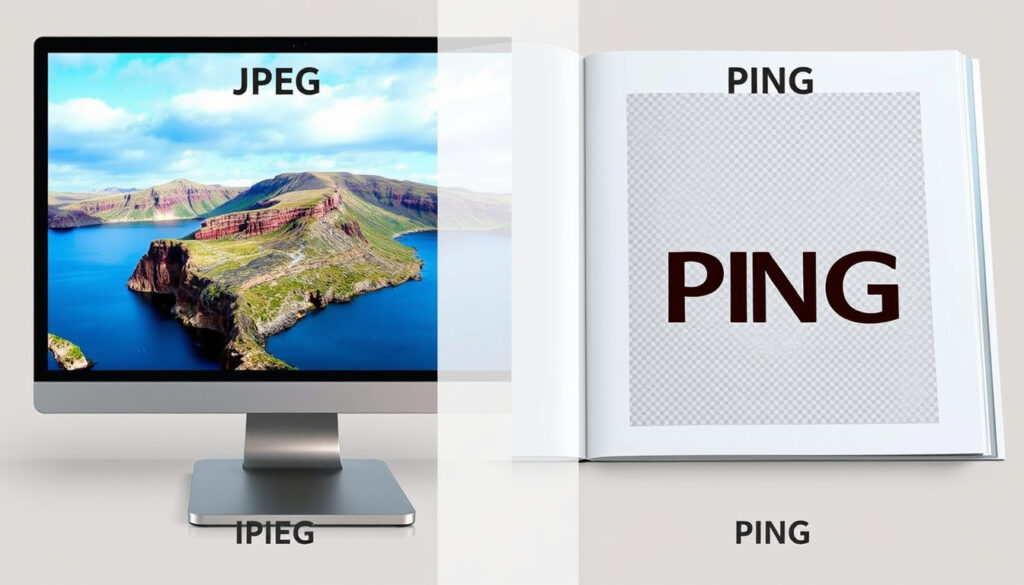
What is a JPG vs PNG? Comparison Guide for Web & Print
Anyone who has saved a photo or a screenshot has faced the choice: JPG or PNG? It seems like a small decision, but the format you pick affects file size, image quality, and even whether your background stays transparent. This guide breaks down the real differences between JPG and PNG using verifiable compression data and practical use cases, so you can pick the right format every time.
JPG file size reduction: typically 5-15% of original ·
PNG max color depth: 16.7 million colors (24-bit) ·
JPG compression type: lossy ·
PNG compression type: lossless ·
PNG transparency support: yes, with alpha channel ·
JPG transparency support: no
Quick snapshot
- JPEG uses lossy compression that discards data (Adobe (file format standards body))
- PNG uses lossless compression preserving all image data (Adobe (file format standards body))
- JPG files are typically smaller than PNG for the same photo (Adobe (file format standards body))
- Exact compression ratio varies per image content (TechSmith (screenshot and video software specialist))
- 1992: JPEG standard released by Joint Photographic Experts Group (Wikipedia (online encyclopedia))
- 1996: PNG released as a patent-free alternative to GIF (Wikipedia (online encyclopedia))
- WebP and AVIF formats are gaining traction for better compression (TechSmith (screenshot and video software specialist))
Two file formats, ten key differences: the table below shows exactly how JPG and PNG compare on compression, color, and transparency.
| Attribute | JPG (JPEG) | PNG |
|---|---|---|
| Full name | Joint Photographic Experts Group | Portable Network Graphics |
| Compression method | Lossy (discards data) | Lossless (preserves all data) |
| Max colors | 16.7 million (24-bit) | 16.7 million (24-bit) or grayscale |
| Transparency | Not supported | Supported via alpha channel |
| Typical uses | Photos, web images, social media | Screenshots, logos, graphics |
| File size (relative) | Smaller | Larger for same resolution |
| Repeated save quality | Degrades with each save | No quality loss |
| Alpha channel | No | Yes |
| Best for text | Poor (artifacts around edges) | Excellent (sharp edges) |
| Standard since | 1992 | 1996 |
The pattern: JPG trades detail for small size, while PNG preserves every pixel at the cost of larger files. Your use case decides which trade-off is worth it.
Is it better to use PNG or JPG?
When to choose JPG
- JPG works best for photographs and complex images where file size matters (TechSmith (screenshot and video software specialist))
- JPG is a strong default for social media photos because it balances quality and smaller file size (Adobe (file format standards body))
Photographers sharing high-resolution shots online: JPG cuts file size by 80–95% with minimal visible loss, making uploads and page loads faster.
When to choose PNG
- PNG is ideal for graphics, logos, and images that need transparency (TechSmith (screenshot and video software specialist))
- PNG is well suited to screenshots, UI mockups, diagrams, icons, and sharp text because it preserves detail well (The Image CDN (web performance and image optimization resource))
Designers and developers: choosing PNG for a logo means you get a transparent background, but the file may be 3–5 times larger than a JPG version of the same graphic.
The implication: if you need crisp edges or a see-through background, PNG is the only option. If you need speed and small file size, JPG wins.
Is a screenshot a PNG or JPEG?
Default screenshot formats on major operating systems
- Windows defaults to PNG for screenshots (Microsoft (operating system developer))
- macOS defaults to PNG (Apple (device manufacturer))
- iPhone uses HEIC/JPEG depending on settings (Apple (device manufacturer))
- Android typically uses PNG (Google (Android platform developer))
- Saving a screenshot as JPG reduces file size but may introduce artifacts around text (The Image CDN (web performance and image optimization resource))
Why this matters: if you capture screenshots frequently, stick with PNG to keep text and UI elements sharp. Only switch to JPG when file size is a concern for storage or email.
How do I convert my JPEG to PNG?
Using Adobe Express online tool
- Adobe Express offers free JPG to PNG conversion online (Adobe (file format standards body))
Using Canva free converter
- Canva allows JPG to PNG conversion with a free account (Canva (online graphic design platform))
Converting on a phone
- Mobile apps like Snapseed and built-in gallery editors can convert JPG to PNG (TechSmith (screenshot and video software specialist))
The catch: converting a JPG to PNG does not recover lost data. The output will be a lossless file containing the already-compressed image, so you get the larger file size without regained quality.
What are the disadvantages of PNG over JPEG?
Larger file size
- PNG files are larger than JPEG equivalents, especially for photographs (TechSmith (screenshot and video software specialist))
Slower loading on websites
- PNG images can slow down page load times on slower connections (Acquia (digital experience platform provider))
- PNG is not ideal for photographs because the file size is unnecessarily large without quality benefit (Adobe (file format standards body))
What to watch: if you manage a website with many product photos, using PNG instead of JPG can increase total page weight by 2–5×, hurting both SEO and user experience.
JPG or PNG which is better for printing?
Print quality considerations
- JPEG can cause artifacts in text-heavy prints (The Image CDN (web performance and image optimization resource))
- PNG is better for sharp text and logos in print (TechSmith (screenshot and video software specialist))
- High-resolution JPEG is acceptable for photo prints when file size needs to be manageable (Adobe (file format standards body))
The pattern: for a printed brochure with photos and text, use PNG for the logo and JPEG for the photo backgrounds — hybrid approach works best.
Comparison table: JPG vs PNG
Three core metrics, one clear distinction: how each format handles data and transparency.
| Feature | JPG | PNG |
|---|---|---|
| Compression type | Lossy | Lossless |
| Transparency | No | Yes (alpha channel) |
| Best for | Photographs, web images | Screenshots, graphics, logos |
| File size | Smaller | Larger |
| Repeated saves | Quality degrades | No degradation |
| Color depth | 24-bit (16.7M colors) | 24-bit + grayscale |
| Alpha channel | Not supported | Supported |
| Common extension | .jpg, .jpeg | .png |
The trade-off: JPG shrinks files by discarding detail; PNG keeps everything but costs space. No format is universally better.
Spec table: JPG and PNG technical specifications
Eight technical specs, one takeaway: both formats support millions of colors, but only PNG offers transparency and lossless editing.
| Specification | JPG | PNG |
|---|---|---|
| Compression algorithm | Discrete Cosine Transform (DCT) | DEFLATE (lossless) |
| Max image size | 65535 × 65535 pixels | 2^31-1 × 2^31-1 pixels |
| Bit depth | 8-bit per channel (24-bit total) | 1–16-bit per channel, up to 48-bit |
| Gamma correction | Yes (optional) | Yes |
| Metadata support | EXIF, XMP, ICC | Text chunks, ICC, EXIF |
| Animation | No | No (APNG supported by some browsers) |
| Lossless rotation | Yes (with software) | Not applicable (no compression loss) |
| Patent issues | Historically patent-encumbered (LZW) | Patent-free design |
Why this matters: Png’s higher bit depth and gamma support make it a better choice for professional graphics workflows where color accuracy is critical.
Pros and Cons
Upsides
- JPG: small file size, universal support, good for photos
- PNG: lossless quality, transparency, sharp text, no quality loss on edits
Downsides
- JPG: no transparency, quality degrades with repeated saves, artifacts on text
- PNG: large file size, slower to load, overkill for photographs
How to choose between JPG and PNG: step-by-step
- Identify the image content: is it a photograph, a graphic, or a screenshot?
- Check if you need transparency (background removal, layering). If yes, choose PNG.
- If file size is a priority (web, email, social media), choose JPG for photos.
- If the image contains text, diagrams, or sharp edges, choose PNG.
- If you plan to edit and save the image multiple times, work in PNG to avoid quality loss, then export a JPG for final delivery.
The pattern: start with PNG for editing, export to JPG for sharing — that way you never lose quality.
Clarity section: what we know vs what’s uncertain
Confirmed facts
- JPEG uses lossy compression (Adobe (file format standards body))
- PNG uses lossless compression (Adobe (file format standards body))
- PNG supports transparency (Adobe (file format standards body))
- JPEG file size is smaller than PNG for the same image (TechSmith (screenshot and video software specialist))
What’s unclear
- Exact compression ratio varies per image content (TechSmith (screenshot and video software specialist))
Quotes from experts
JPEGs contain less data than PNGs and are usually smaller in size.
— Adobe file format guide (Adobe (file format standards body))
PNGs offer high-quality compression, JPGs use less space and load faster online.
— TechSmith blog (TechSmith (screenshot and video software specialist))
Summary
Choosing between JPG and PNG comes down to a single trade-off: do you need small file size, or do you need perfect quality and transparency? For photographers posting on social media, JPG is the efficient choice. For designers building websites with logos and screenshots, PNG is non-negotiable. For the average user capturing a screenshot, the default PNG format is already the right answer — your operating system got it right. The decision is clear: use JPG for photos, PNG for everything else.
imageupsize.com, youtube.com, pixboost.com, reddit.com, imageresizeai.com, tricky-photoshop.com, forums.sketchup.com
For a detailed breakdown of when to use each format, check out this JPG vs PNG comparison guide that covers compression, transparency, and file size differences.
Frequently asked questions
Can PNG files be animated?
PNG itself does not support animation, but APNG (Animated Portable Network Graphics) is supported by most modern browsers. However, it is not as widely used as GIF.
Does JPG lose quality every time you save?
Yes, each time you open and save a JPEG, it recompresses and discards more data, causing gradual quality loss. Always keep a lossless original (PNG or TIFF) if you plan to edit.
What is the difference between JPG and JPEG?
There is no technical difference. JPG is a shortened version of JPEG (Joint Photographic Experts Group) due to older file systems that allowed only three-character extensions. They are identical formats.
Is PNG better for logos?
Yes, because PNG supports transparency, allowing logos to sit on any background without a white square around them. JPG cannot do that.
Why are my PNG files so large?
PNG uses lossless compression, which preserves every pixel. For photographs with many colors and gradients, this results in larger file sizes compared to lossy JPEG compression.
Can I convert JPG to PNG without losing quality?
Yes, you can convert a JPG to a PNG without any additional quality loss — but the JPG’s existing compression artifacts are permanent. The PNG will just preserve those artifacts perfectly.
More related posts
 House of the Dragon Season 3: Release Date and Cast
 Natural Wonders of the World: Official Lists & New Wonders
 Open Homes Near Me – Find Local Listings and Schedules
 Things to Do on Waiheke Island: Free & Paid Activities
 Stand Up Paddle Board Guide for Beginners in Ireland
 Adam Brody Movies and TV Shows: The Complete Guide
 Albany Junior High School – Ratings, Reviews and Enrollment Guide
 4000 USD to NZD: Convert $4,000 to New Zealand Dollars
